使用asyncio和aiohttp实现异步IO

asyncio

asyncio是 Python 3.4 中引入的标准库,直接内置了对异步IO的支持。

asyncio 的编程模型就是一个消息循环,从 asyncio 模块中直接获取一个EventLoop的引用,然后把需要执行的协程扔到EventLoop中执行,就实现了异步IO。

下面是来自于 Python 官方文档的例子(请使用 Python3.4 运行),我对它做了一点修改,增加了 2个任务,方便更好地理解 链接>>>

1
2
3
4
5
6
7
8
9
10
11
12
13
14
15
16
17
18
19
20
21
22
23
24
25
26
import asyncio
@asyncio.coroutine
def compute(x, y):
print("Compute %s + %s ..." % (x, y))
yield from asyncio.sleep(2.0)
return x + y
@asyncio.coroutine
def print_sum(x, y):
result = yield from compute(x, y)
print("%s + %s = %s" % (x, y, result))
loop = asyncio.get_event_loop()
tasks = [print_sum(1, 2), print_sum(3, 4), print_sum(5, 6)]
loop.run_until_complete(asyncio.wait(tasks))
loop.close()
# OUTPUT
Compute 3 + 4 ...
Compute 5 + 6 ...
Compute 1 + 2 ...
# 大约 1 秒以后
3 + 4 = 7
5 + 6 = 11
1 + 2 = 3

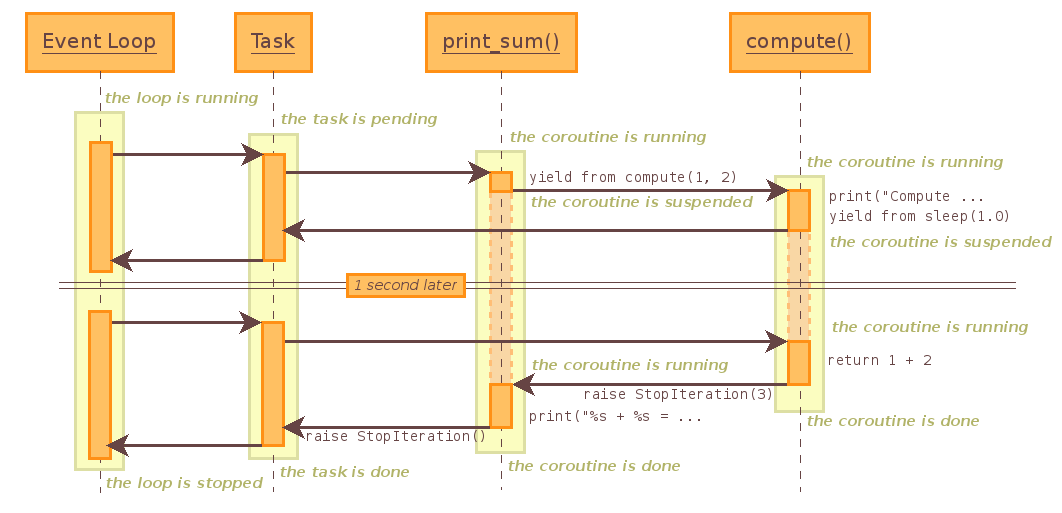
如果是一个任务,就是下面的情况:

EventLoop

@asyncio.coroutine把一个generator标记为coroutine类型,然后把这个coroutine扔到EventLoop中执行。

yield from语法可以让我们方便地调用另一个generator。由于asyncio.sleep()也是一个coroutine,所以线程不会等待asyncio.sleep(),而是直接中断并执行下一个消息循环。当asyncio.sleep()返回时,线程就可以从yield from拿到返回值return x + y,然后接着执行下一行语句print("%s + %s = %s" % (x, y, result))

asyncio.sleep(2.0)看成是一个耗时1秒的IO操作,在此期间,主线程并未等待,而是去执行EventLoop中其他可以执行的coroutine了,因此可以实现并发执行。

aiohttp

asyncio可以实现单线程并发IO操作,它实现了TCP、UDP、SSL 等协议;aiohttp则是基于asyncio实现的 HTTP 框架,使用它可以实现高并发的 HTTP 请求。

由于 aiohttp 是第三方库,使用前先安装:

1
pip install aiohttp

先看一下 aiohttp 官网的例子(请使用 Python 3.5+ 运行),官网链接>>>

1
2
3
4
5
6
7
8
9
10
11
12
13
14
15
16
import aiohttp
import asyncio
import async_timeout
async def fetch(session, url):
with async_timeout.timeout(10):
async with session.get(url) as response:
return await response.text()
async def main(loop):
async with aiohttp.ClientSession(loop=loop) as session:
html = await fetch(session, 'http://python.org')
print(html)
loop = asyncio.get_event_loop()
loop.run_until_complete(main(loop))

由于我用的装的是 Python 3.4 ,对它稍作修改即可,修改方式参见官网 Note

1
2
3
4
5
6
7
8
9
10
11
12
Note:
Throughout this documentation, examples utilize the async/await syntax introduced by PEP 492 that is only valid for Python 3.5+.
If you are using Python 3.4, please replace await with yield from and async def with a @coroutine decorator. For example, this:
async def coro(...):
ret = await f()
should be replaced by:
@asyncio.coroutine
def coro(...):
ret = yield from f()

修改后

1
2
3
4
5
6
7
8
9
10
11
12
13
14
15
16
17
18
import aiohttp
import asyncio
import async_timeout
@asyncio.coroutine
def fetch(session, url):
with async_timeout.timeout(10):
response = yield from session.get(url)
return (yield from response.text())
@asyncio.coroutine
def main(loop):
session = aiohttp.ClientSession(loop=loop)
html = yield from fetch(session, 'http://zhihu.com')
print(html)
loop = asyncio.get_event_loop()
loop.run_until_complete(main(loop))

异步 IO

因为之前写过一个图片爬虫,明显是属于网络 IO 型的应用,如果用异步的方式来爬取图片会如何?

下面直接看代码:

1
2
3
4
5
6
7
8
9
10
11
12
13
14
15
16
17
18
19
20
21
22
23
24
25
26
27
28
29
30
31
32
33
34
35
36
37
38
39
40
41
42
43
44
45
46
47
48
49
50
51
52
53
54
55
56
57
58
59
60
61
62
63
64
65
66
67
68
69
70
71
72
73
74
75
76
77
78
79
80
81
82
83
84
85
86
87
88
89
90
91
92
93
94
95
96
97
98
99
100
101
102
import os
from bs4 import BeautifulSoup
import asyncio
import aiohttp
header = {'User-Agent': 'Mozilla/5.0 AppleWebKit/537.36 (KHTML, like Gecko) \
Chrome/49.0.2623.110 Safari/537.36', 'content-encoding': 'gzip'
}
def urls():
"""返回需要下载图片的网页URL"""
start_url = int(input('请输入开始页面编号:'))
end_url = int(input('请输入结束页面编号:'))
while start_url < end_url:
yield 'http://www.meizitu.com/a/%s.html' % start_url
start_url += 1
def collect_picture_link(soup):
"""将网页URL中的图片URL抓取出来"""
picture_link_list = []
for link_node in soup.find_all(class_='postContent'):
for link in link_node.find_all('img'):
picture_link_list.append(link.get('src'))
return picture_link_list
def create_directory(url, soup):
"""创建以标题为名的文件夹"""
try:
title = soup.title.string[:-6]
url_cut = len(url) - 5
url_id = url[25:url_cut]
# Python文件的绝对路径
path = os.path.dirname(os.path.realpath(__file__))
if not os.path.exists(path + '/' + url_id + ' ' + title):
os.mkdir(path + '/' + url_id + ' ' + title)
dir = path + '/' + url_id + ' ' + title + '/'
return dir
except TypeError:
print('页面无图片! %s' % url)
@asyncio.coroutine
def download_picture(picture_link, dir, header):
"""下载并保存图片"""
picture_name = picture_link[-18:].replace('/', '-')
try:
with aiohttp.Timeout(20):
if not os.path.exists(dir + picture_name):
print('开始下载图片 %s' % picture_link)
r = yield from aiohttp.request('GET',
picture_link, headers=header)
picture = yield from r.read()
with open(dir + picture_name, 'wb') as file:
file.write(picture)
print('图片下载成功 %s' % picture_name)
except asyncio.TimeoutError:
print('下载图片超时 %s' % picture_name)
except Exception as e:
raise e
@asyncio.coroutine
def get_html(url):
"""获取页面 html 文件并用 BeautifulSoup 解析出图片链接"""
try:
with aiohttp.Timeout(40):
print('正在获取页面 %s' % url)
r = yield from aiohttp.request('GET', url, headers=header)
print('获取页面成功 %s' % url)
t = yield from r.text(encoding='gbk')
soup = BeautifulSoup(t, "html.parser")
dir = create_directory(url, soup)
links = collect_picture_link(soup)
for picture_link in links:
yield from download_picture(picture_link, dir, header)
except asyncio.TimeoutError:
print('获取页面超时 %s' % url)
except Exception as e:
raise e
def run():
tasks = []
for url in urls():
tasks.append(get_html(url))
loop = asyncio.get_event_loop()
loop.run_until_complete(asyncio.wait(tasks))
loop.close()
print('所有图片下载完成!')
if __name__ == '__main__':
run()

由于异步用在 IO 这种耗时的操作才有意义,因此只需对程序中涉及到网络通信的部分重写。

爬虫运行的流程:

爬虫先获取页面的 HTML 文件get_html() —> 解析文件中的图片链接 —> 用图片链接直接获取图片文件download_picture() —> 保存图片

使用异步后,爬取图片的效率提升相当的明显,以前下载 50 个页面大约耗时 30 分钟,现在 1 分钟内就能下完,有兴趣的朋友可以试试。

项目地址

GitHub - wish007/crawler

文件名:meizitu_asynchronous.py

参考文档