使用uWSGI和Nginx部署Flask

本项目分为以下三层架构,Web 框架为 Flask,WSGI 层选用 uWSGI ,Web 服务器采用 Nginx。
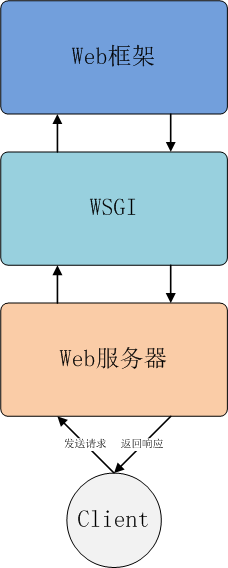
Web框架、WSGI与Web服务器的三层关系

项目地址

GitHub - wish007/shadowsocks-flask

创建虚拟环境

安装虚拟环境库 virtualenv

1
pip3 install virtualenv

创建名为 flask 的虚拟环境

注意:

下面创建虚拟环境命令的命令可能会报错,因为命令执行文件可能不在当前目录

1
2
3
virtualenv flask
出现报错:
-bash: virtualenv:command not found

正确的做法:

  1. 使用命令查找virtualenv安装目录
1
2
3
find / -name virtualenv
输出
/usr/local/python3/bin/virtualenv
  1. 创建名为flask的虚拟环境命令
1
2
3
4
5
6
7
/usr/local/python3/bin/virtualenv flask
下列输出表示成功
Using base prefix'/usr/local/python3'
New python executablein /root/env/flask/bin/python3
Also creatingexecutable in /root/env/flask/bin/python
Installing setuptools,pip, wheel...done.

激活虚拟环境

1
2
3
source env/flask/bin/activate
即:
source 虚拟环境目录/bin/activate

退出虚拟环境(直接在虚拟环境状态)

1
deactivate

安装Flask的Python库依赖

在服务器创建Flask项目目录,将本地项目文件放在此目录下

1
2
3
4
5
6
7
8
9
[sun@SS ~]$ tree flask/
flask/
├── hello.py
├── requirements.txt
├── static
│   └── favicon.ico
└── templates
   ├── base.html
   └── index.html

在虚拟环境中安装所有依赖

1
(flask) [sun@SS env]$ pip install -r requirements.txt

如果没有requirements.txt文件,先在本地开发环境执行以下命令生成

1
pip freeze >requirements.txt

测试虚拟环境

1
2
(flask) [sun@SS flask]$ python hello.py
* Running on http://0.0.0.0:5000/ (Press CTRL+C to quit)

以下有正确返回说明Flask运行正常

1
(flask) [sun@SS flask]$ curl http://127.0.0.1:5000

安装uWSGI

安装 uWSGI

1
pip install uwsgi

配置 uWSGI

在 Flask 项目目录下新建 uWSGI 配置文件 uwsgi_config.ini 并输入

1
2
3
4
5
6
7
8
[uwsgi]
master = true
wsgi-file = hello.py #Flask启动程序
callable = app #hello.py内的Flask类实例
socket = 127.0.0.1:5001 #启动端口
processes = 4
threads = 2
chdir = /home/sun/flask

启动 uWSGI

1
(flask) [sun@SS flask]$ uwsgi uwsgi_config.ini

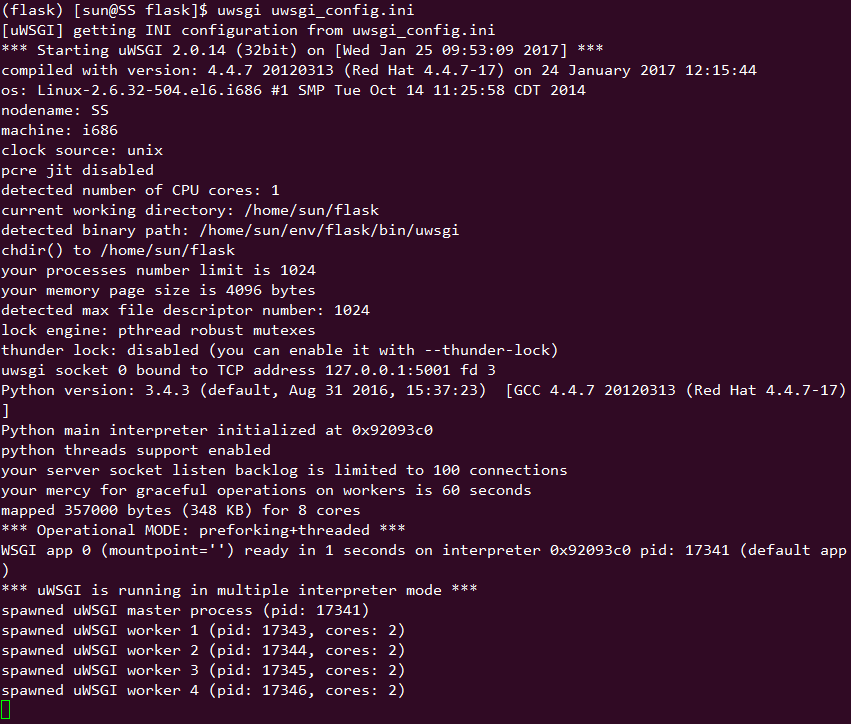
出现下面输出说明配置正确

运行 uWSGI

关闭 uWSGI

1
pkill -9 uwsgi

安装Nginx

安装 Nginx

1
yum install nginx

配置 Nginx

配置文件目录:/etc/nginx/conf.d 目录下的 default.conf

1
2
3
4
5
6
7
8
9
10
11
12
server {
listen 80;
server_name x.x.x.x; #公网IP地址
location / {
include uwsgi_params;
uwsgi_pass 127.0.0.1:5001; # 将所有请求将转发给uwsgi所监听的端口
uwsgi_param UWSGI_PYHOME /root/env/flask; # 指向虚拟环境目录
uwsgi_param UWSGI_CHDIR /root/flask; # 指向网站根目录
uwsgi_param UWSGI_SCRIPT hello:app; # 指定启动程序
uwsgi_read_timeout 10;
}
}

开启 Nginx

1
service nginx start

关闭 Nginx

1
service nginx stop

安装supervisor

安装完 uWSGI、Nginx 后,Nginx可以直接设置开机启动,但 uWSGI 还不能直接开机启动,这里我用 Supervisor 来启动并守护 uWSGI 运行,在全局 Python 环境安装 Supervisor:

1
pip install supervisor

配置 supervisor

配置文件目录:/etc/supervisord.conf

1
2
3
4
5
6
7
8
9
10
11
12
13
14
15
16
[program:flask]
# 启动命令入口
command=/home/sun/env/flask/bin/uwsgi /home/sun/flask/uwsgi_config.ini
# 命令程序所在目录
directory=/home/sun/flask
# 启动所使用的用户
user=sun
autostart=true
autorestart=true
startsecs=10
startretries=10
#日志地址
stdout_logfile=/home/sun/flask/uwsgi_supervisor.log
stdout_logfile_maxbytes = 50MB
stderr_logfile=/home/sun/flask/uwsgi_err.log
stderr_logfile_maxbytes = 50MB

启动 supervisor

1
service supervisord start

启动 supervisor 后,可以手动关闭uwsgi进程,pstree后发现uwsgi进程的确被关闭,稍等片刻再查看进程发现uwsgi进程会再次出现,说明守护进程功能正常。

关闭 supervisor

1
service supervisord stop

设置 supervisor 开机启动

1
2
chkconfig --add supervisord
chkconfig supervisord on

查看开机启动项

1
2
> chkconfig
>